> ## Documentation Index
> Fetch the complete documentation index at: https://docs.rocky.global/llms.txt
> Use this file to discover all available pages before exploring further.
# Access and permissions
> How you get access to the club portal, which permissions exist, and how to invite or revoke other administrators.
## How you get access
The portal (`/dashboard-club`) requires two things at once:
1. The **Club role** on your account.
2. Being an **active administrator of the club** you are trying to open. If you open the link of a club you don't administer, access is denied.
You don't register yourself as an administrator: **someone invites you**. There are two ways:
| Who invites | Where |
| ------------------------------------------------------------------------------------------ | ------------------------------------------------------------------------------------------------------------------------- |
| A club administrator who already has access (with the permission to manage administrators) | **Administrators** screen of the club dashboard |
| The **organizer** of the organization the club belongs to | Organizer panel, under **Clubs → Administrators** (see [Clubs and bank-transfer approvals](/en/roles/organizador/clubes)) |
To invite someone you only need their **name** and **email**. If they have no account, one is created and they receive an email with a link to **set their password**; if they already have one, they receive a notice ("Access to the club portal") with a button to open the club dashboard.
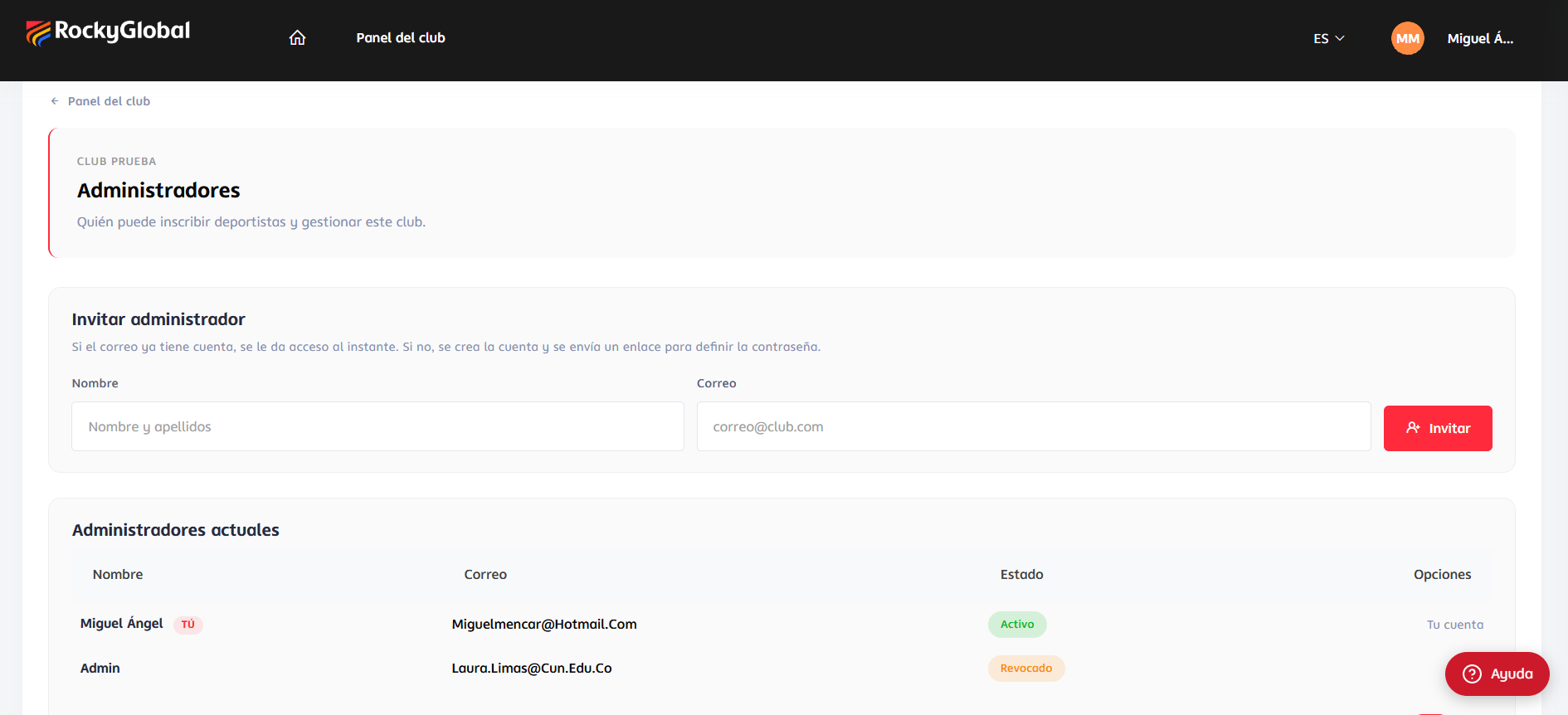 One person can administer **several clubs**, and a club can have **several administrators**. At `/dashboard-club` you see every club you administer.
## Permissions
The Club role includes three permissions. Each screen requires the one that matches it:
| Permission | What it allows |
| ------------------- | ---------------------------------------------------------------------------------------------------------------------------------------------- |
| `club.orders.view` | **Consult** the club's orders: list, detail, **Excel export** and **receipt download**. Read-only. |
| `club.orders.edit` | **Operate** orders: see open events, **register athletes**, upload Excel, **pay**, **cancel**, resume payments and **edit** an athlete's data. |
| `club.users.manage` | **Manage administrators**: see the list, invite and revoke. |
The **Club** role has all three. For a more limited profile (for example, someone who only consults), a **custom role** with only some of them can be created from `/admin/roles`.
With only `club.orders.view` a person **cannot** create orders, pay, cancel or edit athletes, even though they can see the club's orders.
## Revoking an administrator's access
On the **Administrators** screen you can revoke someone's access. Their record is **not deleted**: it is marked as revoked and they lose access to that club.
If they have **no active club left**, they also lose the Club role and its `club.*` permissions. Their data and the orders they created **are kept**.
## Security: what the system checks at every step
* **Role and club**: every URL that includes a club checks that you are an active administrator of *that* club.
* **Order and club**: every URL with an order or an athlete checks that the order belongs to your club and was created from the portal.
* **Prices**: the total is always recomputed on the server from the rate and the event rules. Any request trying to send its own price or total is **rejected entirely**.
One person can administer **several clubs**, and a club can have **several administrators**. At `/dashboard-club` you see every club you administer.
## Permissions
The Club role includes three permissions. Each screen requires the one that matches it:
| Permission | What it allows |
| ------------------- | ---------------------------------------------------------------------------------------------------------------------------------------------- |
| `club.orders.view` | **Consult** the club's orders: list, detail, **Excel export** and **receipt download**. Read-only. |
| `club.orders.edit` | **Operate** orders: see open events, **register athletes**, upload Excel, **pay**, **cancel**, resume payments and **edit** an athlete's data. |
| `club.users.manage` | **Manage administrators**: see the list, invite and revoke. |
The **Club** role has all three. For a more limited profile (for example, someone who only consults), a **custom role** with only some of them can be created from `/admin/roles`.
With only `club.orders.view` a person **cannot** create orders, pay, cancel or edit athletes, even though they can see the club's orders.
## Revoking an administrator's access
On the **Administrators** screen you can revoke someone's access. Their record is **not deleted**: it is marked as revoked and they lose access to that club.
If they have **no active club left**, they also lose the Club role and its `club.*` permissions. Their data and the orders they created **are kept**.
## Security: what the system checks at every step
* **Role and club**: every URL that includes a club checks that you are an active administrator of *that* club.
* **Order and club**: every URL with an order or an athlete checks that the order belongs to your club and was created from the portal.
* **Prices**: the total is always recomputed on the server from the rate and the event rules. Any request trying to send its own price or total is **rejected entirely**.