> ## Documentation Index
> Fetch the complete documentation index at: https://docs.rocky.global/llms.txt
> Use this file to discover all available pages before exploring further.
# Orders and athletes
> The club's order history, what each status means, the order detail (Excel export and receipt) and how to edit an athlete's data.
## My orders
**My orders** (`/dashboard-club/{club}/ordenes`) lists every order your club created from the portal, newest first. It requires `club.orders.view`. Only orders created **from the club portal** and from **your** club appear.
Four tabs filter by status, each with a badge for the **whole club** (not just the current page): **All**, **To pay** (Pending payment, Payment not completed and In review (transfer)), **Paid** and **Cancelled**. The table shows the order number, event, athlete count, status, total and the row actions, and can show 10, 20, 50 or 100 orders per page.
| Status | Color | Meaning |
| ------------------------- | ------ | ------------------------------------------------------------------------------------------------------------ |
| **Paid** | Green | Payment confirmed (card), transfer approved by the organizer, or nothing to charge. Athletes are registered. |
| **Pending payment** | Orange | Payment started but not completed or not yet confirmed. |
| **In review (transfer)** | Orange | You chose transfer and the organizer hasn't approved it yet. |
| **Payment not completed** | Orange | Payment was rejected or cancelled at the gateway. |
| **Cancelled** | Red | The order was cancelled and not charged. |
| **Partially cancelled** | Red | The organizer cancelled or refunded only part of the order. |
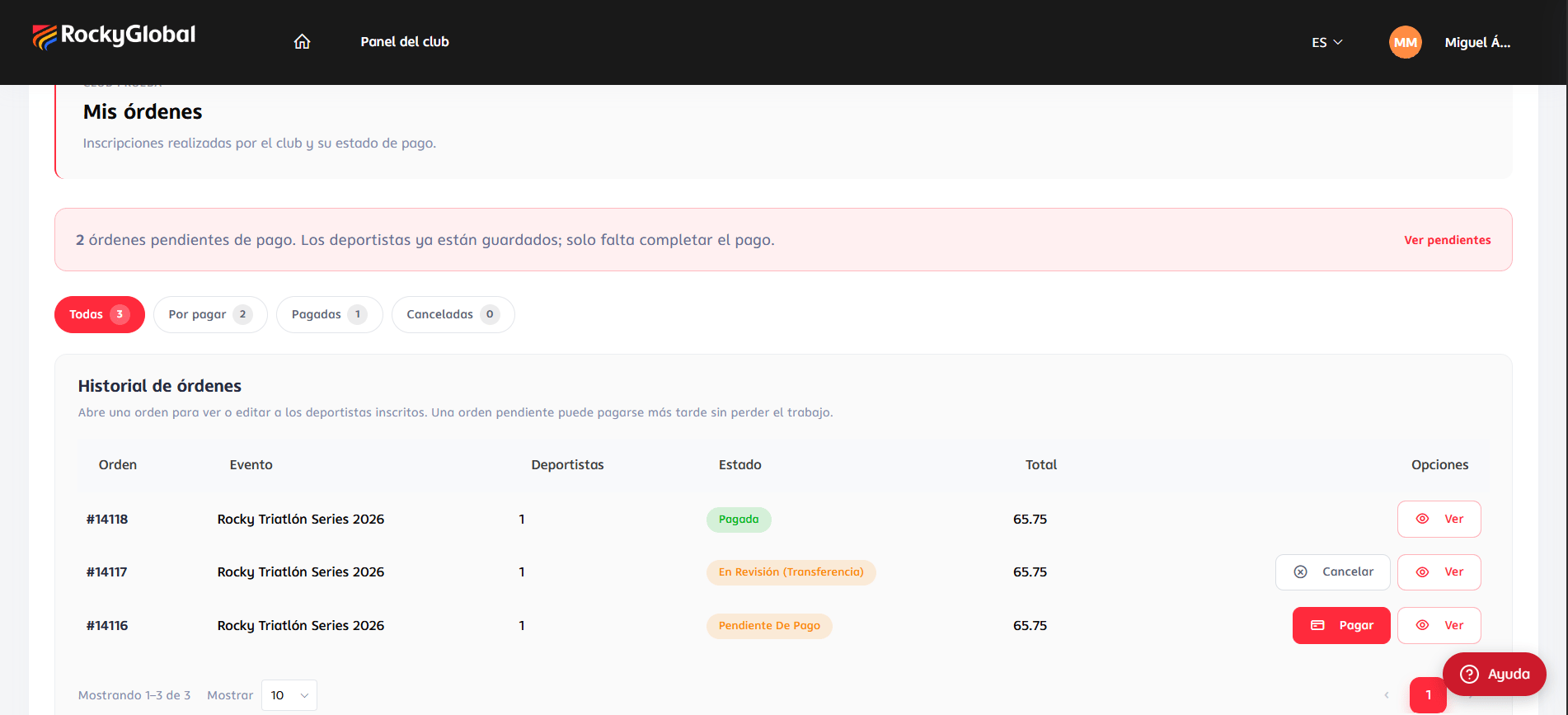 Row actions: **Pay** (unpaid orders), **Cancel** (unpaid orders with no payment in progress, and orders in review) and **View**. Pay and Cancel also require `club.orders.edit`. See [Payments](/en/roles/club/pagos).
## Order detail
**My orders → View** opens the order. It shows the club, `Order #number`, the event, dates and location; a **status box** that changes with the situation (Pay now / Retry payment / Cancel order, the transfer details when in review, or "Order cancelled"); three figures (**Status**, **Athletes**, **Total**); and a paginated **Registered athletes** table with name, email, rate and status (**Registered**, **Pending**, **Cancelled** or **Rate change**).
An athlete is **Pending** while the order isn't paid and becomes **Registered** as soon as the payment is confirmed (or the organizer approves the transfer), for **all** athletes at once.
Row actions: **Pay** (unpaid orders), **Cancel** (unpaid orders with no payment in progress, and orders in review) and **View**. Pay and Cancel also require `club.orders.edit`. See [Payments](/en/roles/club/pagos).
## Order detail
**My orders → View** opens the order. It shows the club, `Order #number`, the event, dates and location; a **status box** that changes with the situation (Pay now / Retry payment / Cancel order, the transfer details when in review, or "Order cancelled"); three figures (**Status**, **Athletes**, **Total**); and a paginated **Registered athletes** table with name, email, rate and status (**Registered**, **Pending**, **Cancelled** or **Rate change**).
An athlete is **Pending** while the order isn't paid and becomes **Registered** as soon as the payment is confirmed (or the organizer approves the transfer), for **all** athletes at once.
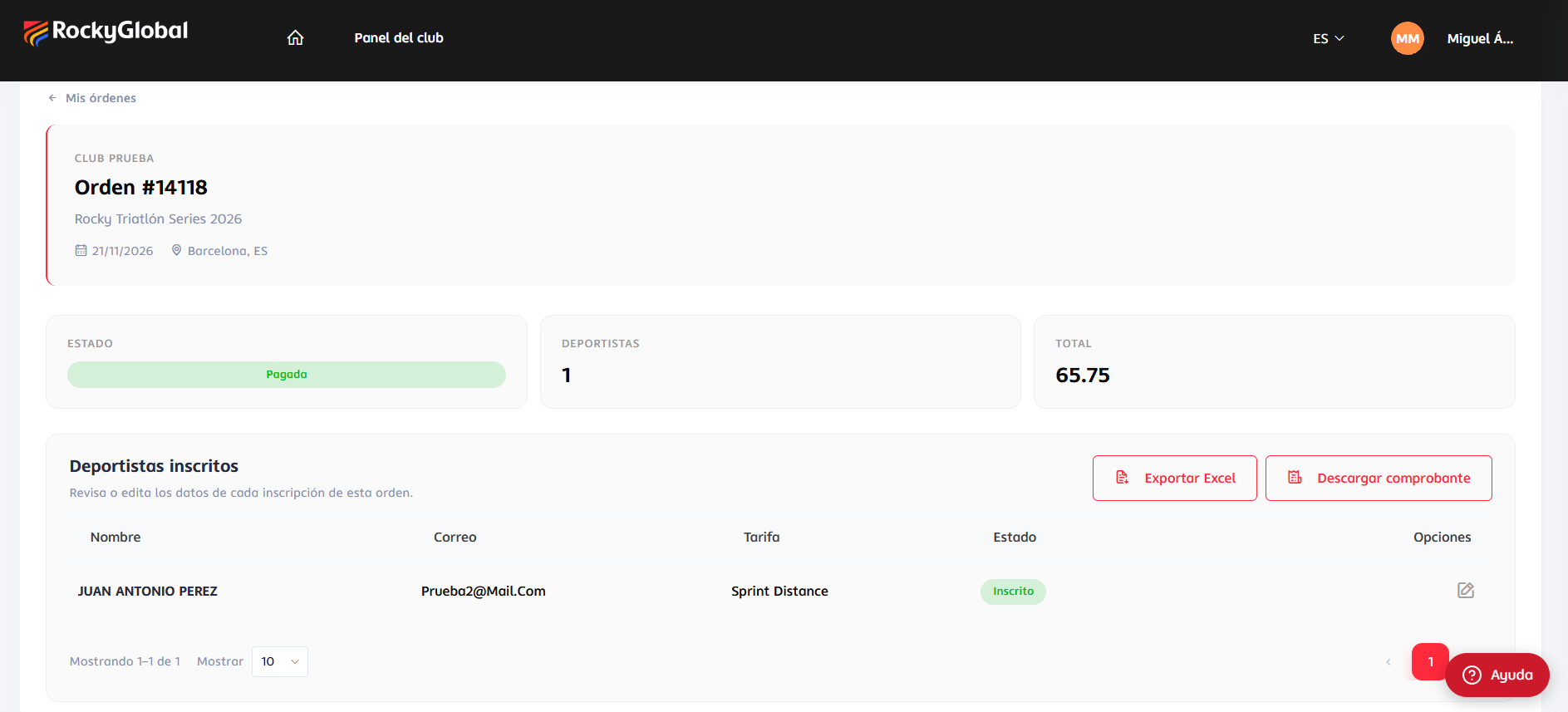 * **Export Excel** downloads `club-{club}-orden-{order}.xlsx` in **any** order status: Locator, Bib, Rate purchased, Status, one column per event-form question (answers shown by their label, plus the club and club-email columns), **Team name** on team-rate orders, and Participant and Email. It is the same file shape the organizer exports.
* **Download receipt** generates a PDF of the order and the registrations it includes, and only appears when the order is **Paid**.
## Editing an athlete
In the detail, press the pencil in the athlete's row (requires `club.orders.edit`).
* **Export Excel** downloads `club-{club}-orden-{order}.xlsx` in **any** order status: Locator, Bib, Rate purchased, Status, one column per event-form question (answers shown by their label, plus the club and club-email columns), **Team name** on team-rate orders, and Participant and Email. It is the same file shape the organizer exports.
* **Download receipt** generates a PDF of the order and the registrations it includes, and only appears when the order is **Paid**.
## Editing an athlete
In the detail, press the pencil in the athlete's row (requires `club.orders.edit`).
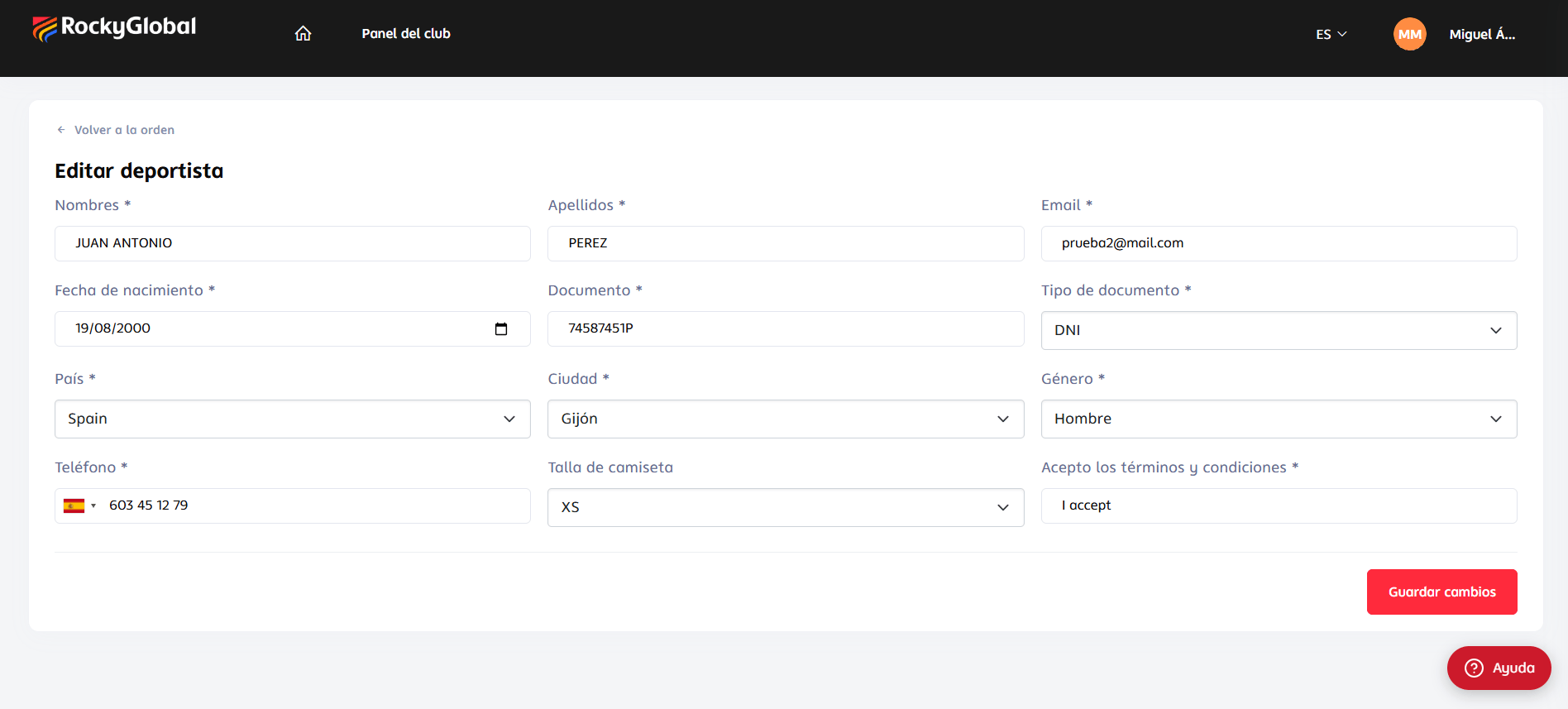 The form is **the one used at registration** for that athlete's rate, with the data pre-filled, except:
* **Priced questions do not appear** (changing them after registration would alter what was charged without a new charge).
* File-upload fields don't appear.
Already-saved values show as **preselected** even if they were stored in another form (a country typed as "ESPAÑA", a gender saved as "Hombre"): the form matches them regardless of case and accents.
**On save:**
* **Only fields with a value are saved.** An empty field **keeps** the existing data; you can't erase a value from this screen.
* The **athlete's profile is also updated** (name, last name, birth date, gender, city, country, document, document type and phone), so the change also shows on their account across other events.
* Some values are **normalized** to the platform's internal format (for example, the country is stored as its code).
You'll see **"This registration can no longer be edited."** if the **event has ended** or the registration is **closed** (check-in closed or the athlete already entered the event).
The form is **the one used at registration** for that athlete's rate, with the data pre-filled, except:
* **Priced questions do not appear** (changing them after registration would alter what was charged without a new charge).
* File-upload fields don't appear.
Already-saved values show as **preselected** even if they were stored in another form (a country typed as "ESPAÑA", a gender saved as "Hombre"): the form matches them regardless of case and accents.
**On save:**
* **Only fields with a value are saved.** An empty field **keeps** the existing data; you can't erase a value from this screen.
* The **athlete's profile is also updated** (name, last name, birth date, gender, city, country, document, document type and phone), so the change also shows on their account across other events.
* Some values are **normalized** to the platform's internal format (for example, the country is stored as its code).
You'll see **"This registration can no longer be edited."** if the **event has ended** or the registration is **closed** (check-in closed or the athlete already entered the event).