> ## Documentation Index
> Fetch the complete documentation index at: https://docs.rocky.global/llms.txt
> Use this file to discover all available pages before exploring further.
# Registering athletes
> How to build a club order with the manual form or the Excel import, and how discounts work.
From **Register athletes → (event)** you reach the `Register athletes` screen. There you build **one order** with all the athletes you want to register under the **same rate**. There are two ways to load them.
## Manual form
Pick the event **rate**. Every athlete in the order uses the same one. Only the event's **active** rates appear.
Choosing the rate loads the event's form. Press **Add athlete**: each person has their own accordion. Repeat until everyone is in.
Press **Review and continue**. The system validates the data; if something fails, it highlights that athlete's row.
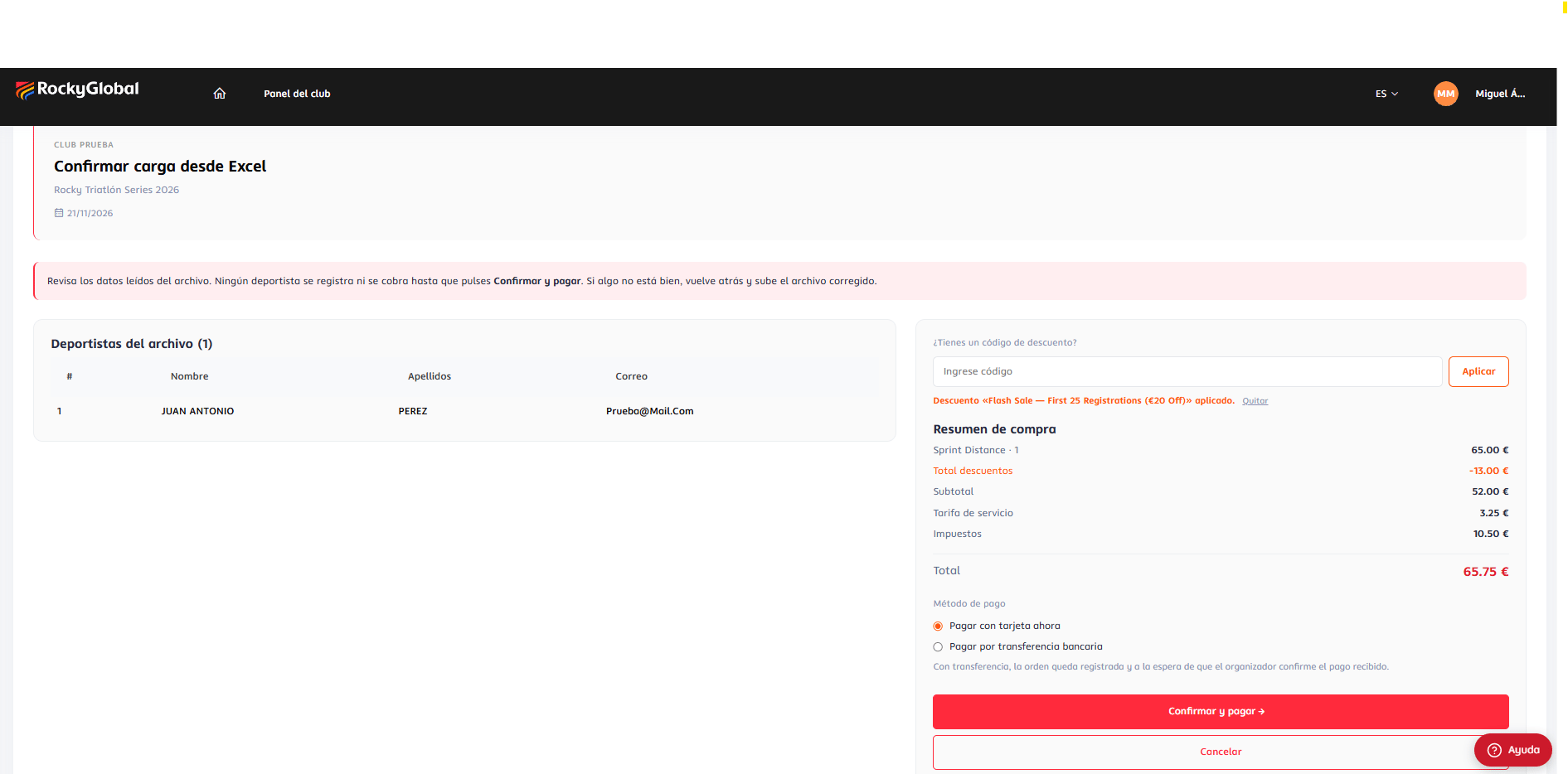
A window **"Review the registration before paying"** shows the athletes and the purchase summary. From there you can apply a discount code, choose the payment method and press **Confirm and pay** (or **Edit** to go back).
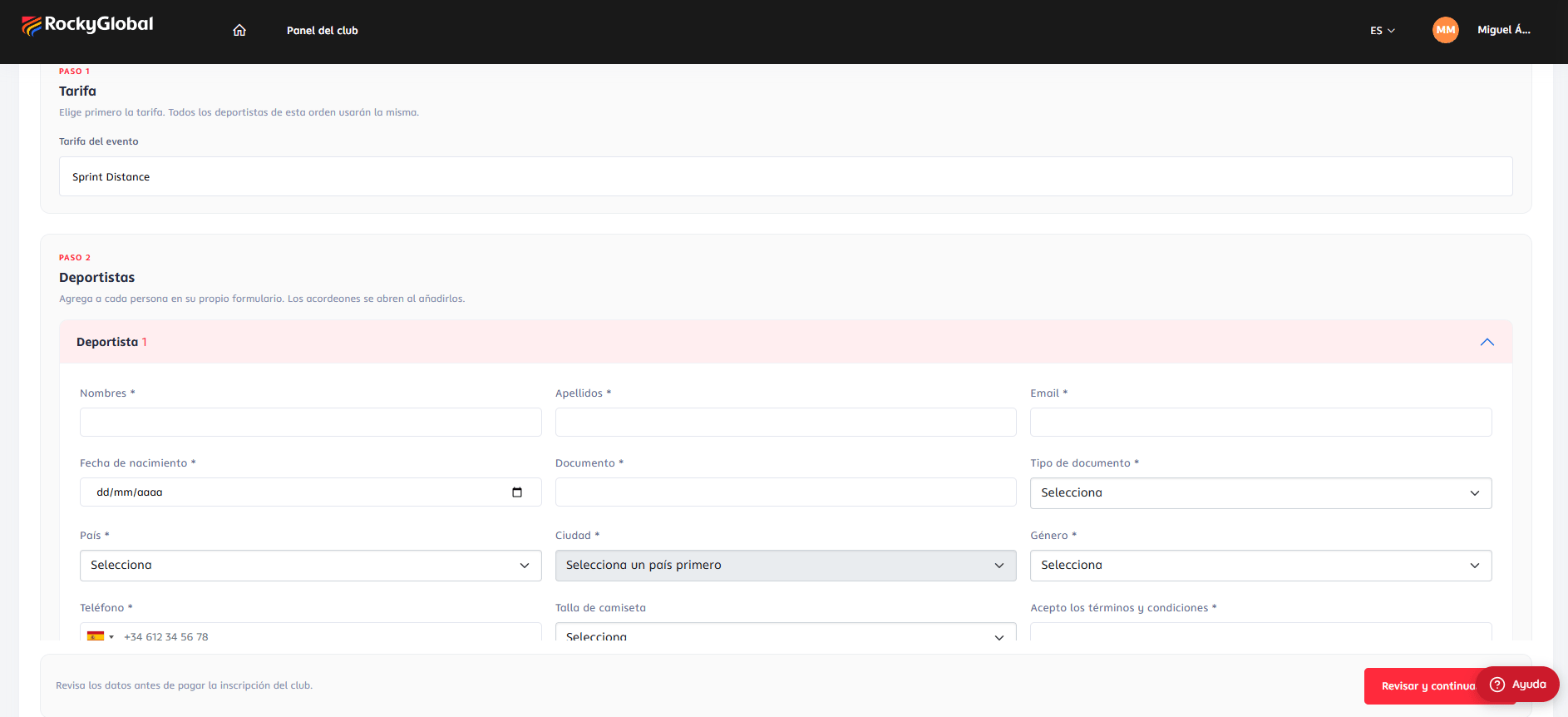 The form is **the event's own**: same fields and same visibility/required rules as the public checkout, for the chosen rate. The portal **fills in for you** the club-membership question (the club is the one in the URL) and the **category** (computed from date of birth and gender). **Required** priced questions (for example, cancellation insurance) appear on each athlete's card and are **charged per athlete**; optional extras are not offered.
**File-upload fields** are not supported: if the rate requires one, you'll see a notice to contact Rocky Global. The event store and hotel bookings are **not available** in the club portal.
**Team rates.** The title becomes **Teams** and the button **Add team**. Each team has **exactly** the number of athletes set by the rate, and a **Team data** block holds the questions answered once for the whole order.
**When you confirm**, the order is created with **all** athletes. If an athlete's email already exists on the platform, that account is reused and its profile updated; otherwise a new athlete account is created. The total is **recomputed on the server**, and quotas (event and rate) are **re-checked at creation**, so the last club to confirm may find the event full ("The event reached the participant limit." / "This rate reached its registration limit.").
| Situation | Result |
| ------------------------------------------ | -------------------------------------------- |
| Total **above 0** and **card** payment | Takes you to the payment gateway. |
| Total **above 0** and **transfer** | The order stays **"In review (transfer)"**. |
| Total **0** (for example, a 100% discount) | No charge: the order is **Paid** right away. |
## Excel import
Use the **quick option** on the same screen: choose the rate, press **Download template**, fill it in, drop the file (`.xlsx`/`.xls`, up to **5 MB**) and press **Upload and review**.
The form is **the event's own**: same fields and same visibility/required rules as the public checkout, for the chosen rate. The portal **fills in for you** the club-membership question (the club is the one in the URL) and the **category** (computed from date of birth and gender). **Required** priced questions (for example, cancellation insurance) appear on each athlete's card and are **charged per athlete**; optional extras are not offered.
**File-upload fields** are not supported: if the rate requires one, you'll see a notice to contact Rocky Global. The event store and hotel bookings are **not available** in the club portal.
**Team rates.** The title becomes **Teams** and the button **Add team**. Each team has **exactly** the number of athletes set by the rate, and a **Team data** block holds the questions answered once for the whole order.
**When you confirm**, the order is created with **all** athletes. If an athlete's email already exists on the platform, that account is reused and its profile updated; otherwise a new athlete account is created. The total is **recomputed on the server**, and quotas (event and rate) are **re-checked at creation**, so the last club to confirm may find the event full ("The event reached the participant limit." / "This rate reached its registration limit.").
| Situation | Result |
| ------------------------------------------ | -------------------------------------------- |
| Total **above 0** and **card** payment | Takes you to the payment gateway. |
| Total **above 0** and **transfer** | The order stays **"In review (transfer)"**. |
| Total **0** (for example, a 100% discount) | No charge: the order is **Paid** right away. |
## Excel import
Use the **quick option** on the same screen: choose the rate, press **Download template**, fill it in, drop the file (`.xlsx`/`.xls`, up to **5 MB**) and press **Upload and review**.
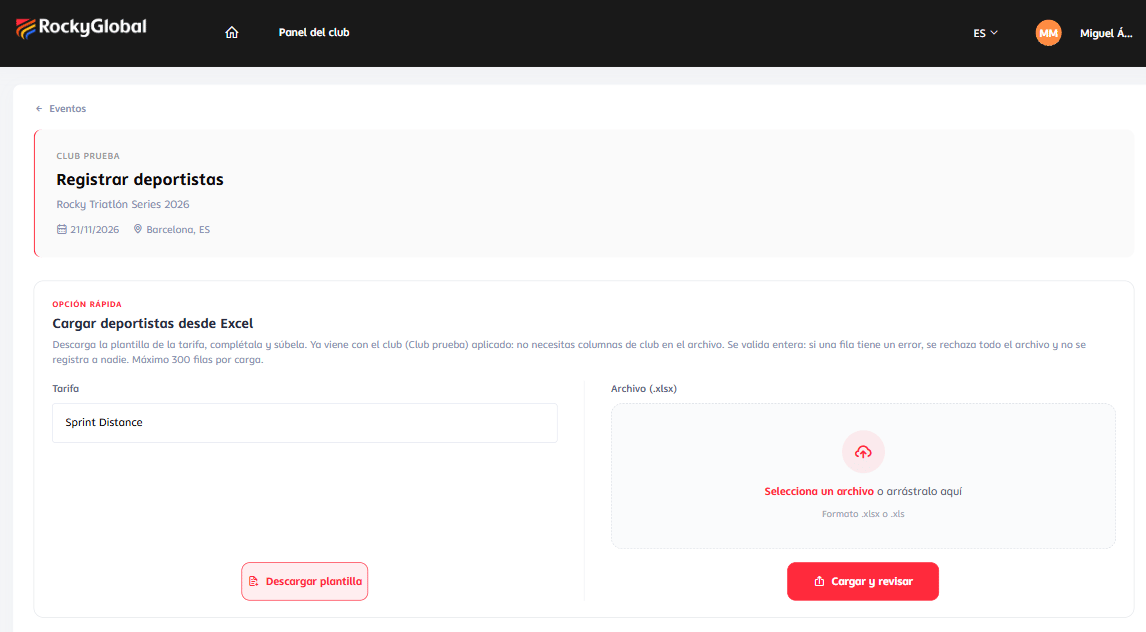 * The template is the one the organizer uses to import participants, scoped to the rate and **without the columns the portal fills in** (club membership, club name/email, and team name on individual rates).
* **Maximum 300 data rows** per upload. Split larger lists into several orders.
* The file is validated **as a whole**: if **a single row** has an error, the **whole file is rejected** and nobody is registered ("No athlete was registered"), listing "Data row N: …".
* If it passes, **Confirm upload from Excel** shows the athletes read, the discount box and the purchase summary. **Nothing is registered or charged until you press Confirm and pay.** The data is kept in your **session**; if it expires you must upload the file again.
* Confirming goes through the same validations and price calculation as the manual form.
* The template is the one the organizer uses to import participants, scoped to the rate and **without the columns the portal fills in** (club membership, club name/email, and team name on individual rates).
* **Maximum 300 data rows** per upload. Split larger lists into several orders.
* The file is validated **as a whole**: if **a single row** has an error, the **whole file is rejected** and nobody is registered ("No athlete was registered"), listing "Data row N: …".
* If it passes, **Confirm upload from Excel** shows the athletes read, the discount box and the purchase summary. **Nothing is registered or charged until you press Confirm and pay.** The data is kept in your **session**; if it expires you must upload the file again.
* Confirming goes through the same validations and price calculation as the manual form.
 ## Discounts
Club orders use **the same discount engine as the public checkout**; discounts are configured by the event's organizer.
## Discounts
Club orders use **the same discount engine as the public checkout**; discounts are configured by the event's organizer.
 | Type | How it works |
| ------------------------- | ----------------------------------------------------------------------------------------------------------------------------------------------------------------------------------------------------------------------------------------------------------------------------------------- |
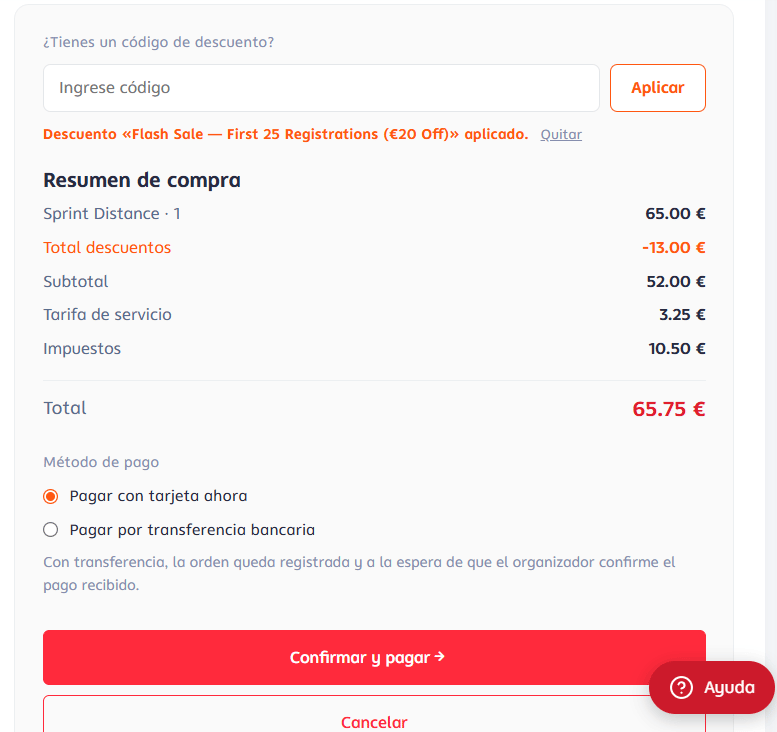
| **Manual code** | Typed in the discount box and applied with **Apply**. Case-insensitive. Accepted only if it belongs to the event, is active, applies to the chosen rate, has uses left and is within its date window. |
| **Automatic per turn** | Applies **by itself** while the event and rate have quota in that promotion. If exhausted, it simply doesn't apply (no error). |
| **Automatic per country** | Applies when the **athlete's country** has a bonus. The **first athlete's** country answer is used (like the group checkout); only if the form doesn't ask the country, the club's registered country is used. Spanish, English names and codes are equivalent ("ESPAÑA", "Spain", "ES"). |
**Combining.** Order of application: **turn → country → code**. A **non-combinable** discount on either side of a turn + code pairing rejects the code. The per-country discount is **not applied when a code is entered**.
**Service fee.** A normal discount only reduces the order value, **not the organizer's service fee**. **Free codes** and **100% discounts** zero the total **including the service fee**.
**Usage counting.** The use of a code is counted when a free order is created, when a card payment is **confirmed**, or when the organizer **approves** a transfer.
| Type | How it works |
| ------------------------- | ----------------------------------------------------------------------------------------------------------------------------------------------------------------------------------------------------------------------------------------------------------------------------------------- |
| **Manual code** | Typed in the discount box and applied with **Apply**. Case-insensitive. Accepted only if it belongs to the event, is active, applies to the chosen rate, has uses left and is within its date window. |
| **Automatic per turn** | Applies **by itself** while the event and rate have quota in that promotion. If exhausted, it simply doesn't apply (no error). |
| **Automatic per country** | Applies when the **athlete's country** has a bonus. The **first athlete's** country answer is used (like the group checkout); only if the form doesn't ask the country, the club's registered country is used. Spanish, English names and codes are equivalent ("ESPAÑA", "Spain", "ES"). |
**Combining.** Order of application: **turn → country → code**. A **non-combinable** discount on either side of a turn + code pairing rejects the code. The per-country discount is **not applied when a code is entered**.
**Service fee.** A normal discount only reduces the order value, **not the organizer's service fee**. **Free codes** and **100% discounts** zero the total **including the service fee**.
**Usage counting.** The use of a code is counted when a free order is created, when a card payment is **confirmed**, or when the organizer **approves** a transfer.