
Types of discount (single event)
Promo code
A code the athlete enters when registering (e.g.
RUNNER10). Created and managed inside the event itself.Tier discount
Activated automatically, without a code, for the first registrations or purchases until the quota you define runs out (a “first N slots” type). It is not date-based — it runs out by usage count, not by calendar.
Country discount
Applied automatically based on the country of the athlete registering, without needing a code. Configured on a separate screen — see below.
If you need a free registration, use a free code and select the categories that should be
reduced to €0. A normal 100% discount does not waive the service fee. See Discount scope below.
General coupons (multi-event)
Beyond per-event discounts, there is a general coupon type: the same code is created once and made available across several events you choose, instead of repeating the setup event by event. This is useful for sponsors, ambassadors, or brand-wide campaigns spanning multiple events.- Created from a dedicated general-coupons screen, found under the Events menu option (outside any single event’s panel), where you select the events it should work in.
- Shares name, percentage/amount, validity window, and combination rules across all events it’s active in, even though internally a separate entry is stored per event.
- Does not support the “country” type. Country discounts are always configured per event.
- You can still restrict which rates it applies to within each event, just like a normal coupon.
- Editing or deleting a general coupon updates or removes all of its copies across the events it’s active in at once.
- Usage is reported per event, just like any other discount — check each event’s own usage report to see how many times it was redeemed there.
System-generated discounts
These are not created by you — the system generates them to leave an accounting trail for an adjustment, so they show up in the “Discounts Used” reports under recognizable names:If you see one of these names in your usage reports, it’s not an error or a leaked coupon — it’s how the system documents an administrative adjustment or credit.
Discount scope: rates only vs. total purchase
When creating any discount (code, tier, or general), you choose whether it applies to:- Total purchase: registration rates, store products, and custom amount fields. It never reduces the organizer/platform fee, which is always calculated on the pre-discount base.
- Rates only: registration rates exclusively. Products, lodging, and add-ons stay untouched, and the fee is unaffected either way.
Generate codes in bulk
From Discounts → Batch discounts, you can generate between 2 and 50 individual codes with the same configuration. You can set an optional prefix of up to 10 alphanumeric characters, select applicable rates, and define the value, stackability, validity, usage limit, and scope. Code names are numbered automatically (Name #001, Name #002, and so on).
Codes become active immediately. The batch lets you inspect, export, activate, and deactivate
all its codes together. You can delete it only while none of its codes has been used; after the
first use, it can only be deactivated.
Combining discounts
Each discount (code, tier, general, or country) has a stackable? toggle. At most two discounts can apply to the same registration: one automatic tier discount plus one manual coupon — and only if both are marked stackable. As soon as either one is non-stackable, only one of them applies. The system evaluates, in order, when a coupon is applied:- Is there already an active tier discount that is non-stackable? → the new coupon is rejected.
- Is the coupon being applied non-stackable, and is there already a tier discount or a previous coupon? → rejected.
- Is there already a non-stackable coupon applied? → any further discount is rejected.
- Is the athlete trying to apply the same coupon twice? → rejected with a distinct message.
- Otherwise, the new coupon is applied (replacing any previous manual coupon in that checkout session; an active tier discount is kept).
Rate change discount code - Order #...) are the one deliberate exception: they’re created as stackable so they can combine with a coupon or tier discount the athlete already had applied.
Create a discount code
1
Go to 'Discounts'
Inside the event panel, go to Discounts → Manage Discounts and click Add New.
2
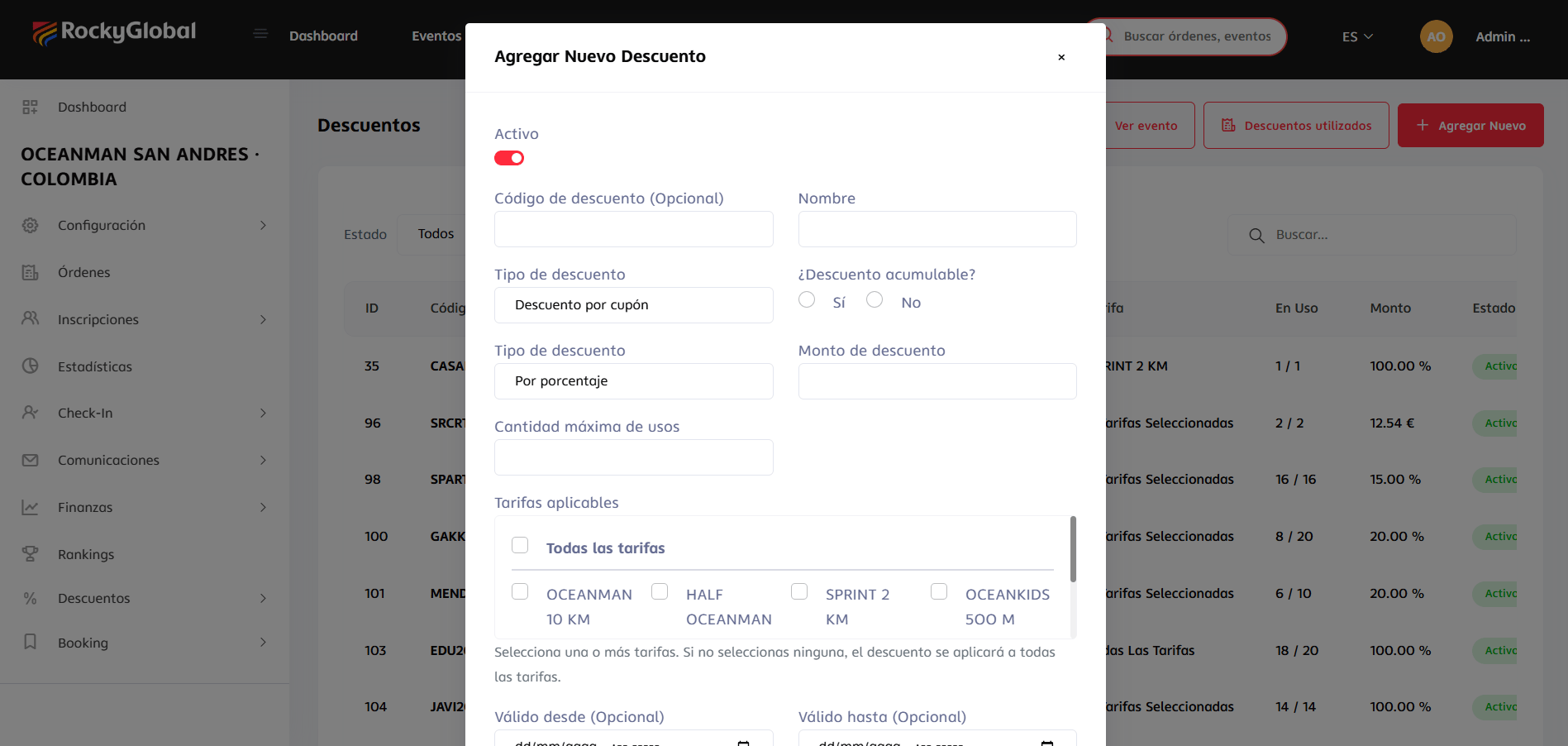
Fill out the form
This same form is used for both “Coupon discount” and “Tier discount” (chosen in Discount Type):
- Active (toggle).
-
Discount code (optional — e.g.
RUNNER10; leave it empty if it’s a “tier” discount, which doesn’t require a code). - Name.
- Discount type: coupon or tier.
- Stackable discount? Yes/No. See Combining discounts above for what this means when the athlete already has another discount applied.
- Value type: percentage or fixed amount (in euros).
- Discount amount.
- Free code (optional): mark this so the registration ends at €0, including the platform fee — unlike a normal discount, which never reduces the fee unless it’s exactly 100%.
- Discount scope: for normal discounts, choose Total purchase (rates + products + custom amounts, never touching the fee) or Rates only (registration rates exclusively; products and lodging stay untouched). Mutually exclusive; new entries default to Rates only.
- Maximum number of uses (for “tier” discounts, this is the quota that runs out).
- Applicable rates: select one or several, or none for it to apply to all rates.
-
Valid from / Valid until (optional).
3
Save and share
If it’s a code, share it through your channels (social media, email marketing, sponsors). If it’s “tier”-based, it activates on its own until the quota runs out.
The usage limit is configured at the level of the code as a whole; we’re evaluating adding a per-individual-user limit further down the road.
If you need the same code to work across several events, don’t repeat it event by event: use a general coupon. General coupons don’t support the “country” type.
Country bonuses
This is a different type of discount, with its own screen — it is not created from the form above, but from Discounts → Country Bonuses.1
Go to 'Country Bonuses'
Inside the event panel, go to Discounts → Country Bonuses and click Add bonus.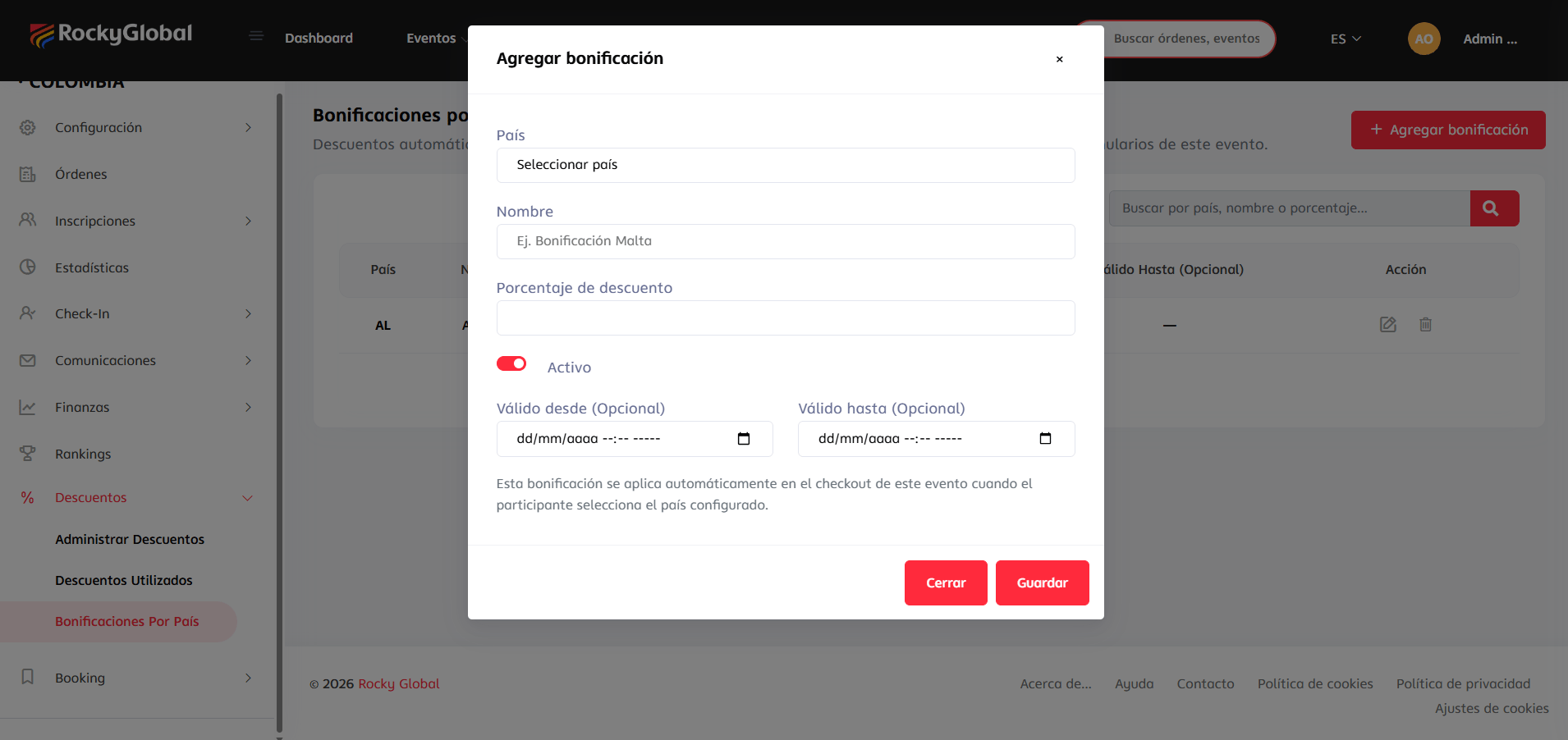
2
Choose the country
Select one country (not multi-select). There can only be one active bonus per country per event.
3
Fill in the details
- Name (optional, e.g. “Malta Bonus”).
- Discount percentage (0.01% to 100%).
- Active (toggle).
- Valid from / Valid until.
4
Save
The bonus becomes active immediately for that country.
You can create several bonuses, one per country, each with its own percentage (for example 10% for one country and 15% for another).
The athlete’s country is taken from the country field they fill in on the registration form (or the country saved in their account, if they’re already logged in) — it is not detected by IP or by the payment card’s country. It is applied automatically at checkout.
Usage reports
In Discounts → Discounts Used you’ll see:- Number of times each code was used.
- Total amount discounted.
- Associated registrations.
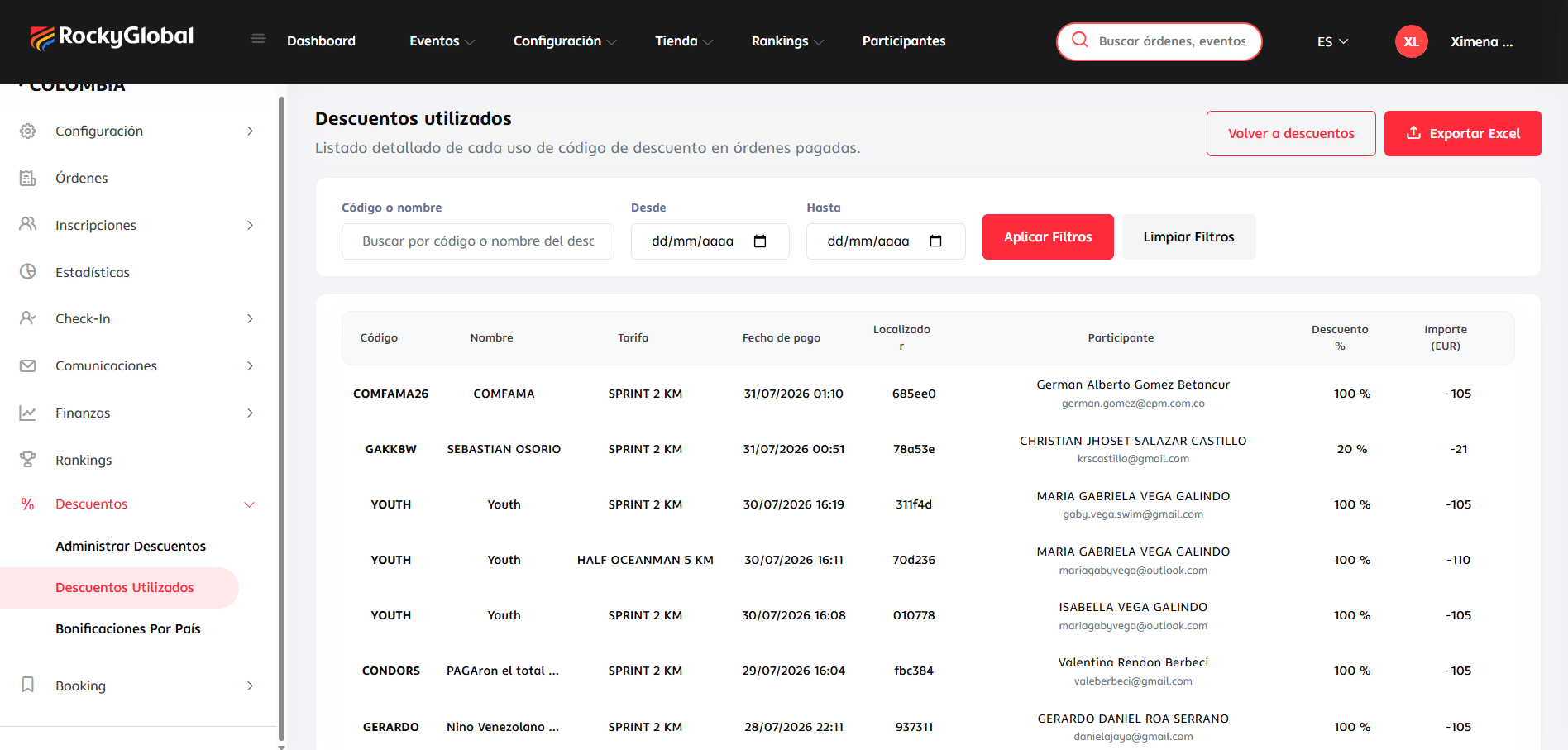
A general coupon is reported per event: if the same code was used across three events, you’ll see its usage reflected separately in each of those events’ reports, not in a combined total.
Manual approval - Order #..., Cancellation discount code - Order #..., or Rate change discount code - Order #... — these are system-generated discounts, not coupons you created, and not an error.